
Cloud Architecture on AWS: 8 Best Practices for Reliable Systems
.png)
Executive Summary
- Cloud architecture in 2026 is no longer about "moving to the cloud" but about designing for AI readiness, cost governance, and operational resilience from day one.
- Architecture decisions directly shape how systems scale, fail, and generate cost under real traffic.
- Scaling patterns determine whether traffic spikes lead to queue buildup or a controlled response.
- Decoupling and multi-AZ design define how failures propagate across services.
- Cost now follows workload behavior, especially with AI-driven demand and bursty compute usage.
- Observability and automation control how quickly issues are detected and resolved in production.
- Strong cloud architecture improves release speed, uptime, and long-term infrastructure efficiency.
- NOVA helps teams assess, redesign, and optimize AWS architectures built for production growth.
To see how these patterns apply to your environment and identify where architecture decisions impact cost, scaling, and reliability, schedule a call with NOVA.
***
Poor cloud architecture creates rising costs, scaling failures, and slower engineering execution. Small design decisions often become expensive operational problems later.
This guide explains AWS cloud architecture best practices that improve scalability, resilience, governance, and cost control in real production environments.
So, let's get right to it.
What Is Cloud Architecture on AWS?
AWS cloud architecture is the design and operation of compute, storage, networking, security, and operational systems using AWS-native building blocks, including managed services, infrastructure primitives, and standardized frameworks, to run production workloads at scale.
This means defining how your cloud workload uses services such as EC2, S3, Lambda, and RDS, often combined with higher-level managed capabilities like Amazon Bedrock or SageMaker to reduce infrastructure management overhead. It also defines how AI/ML services such as Amazon Bedrock and SageMaker handle traffic, data processing, and decision-making.
What differentiates AWS is the depth of managed services and the Well-Architected Framework, which guides decisions across reliability, performance, security, cost, and operational excellence.
Because AWS abstracts physical infrastructure, capacity is delivered as scalable, on-demand resources. This allows systems to automatically adjust to changing workloads, while costs are based on actual usage.
For example, how you distribute traffic or isolate services determines whether a spike leads to queue buildup or controlled scaling.
You can watch this video to learn more:
But this leads us to the benefits of this architecture.
Benefits & Core Principles of AWS Architecture
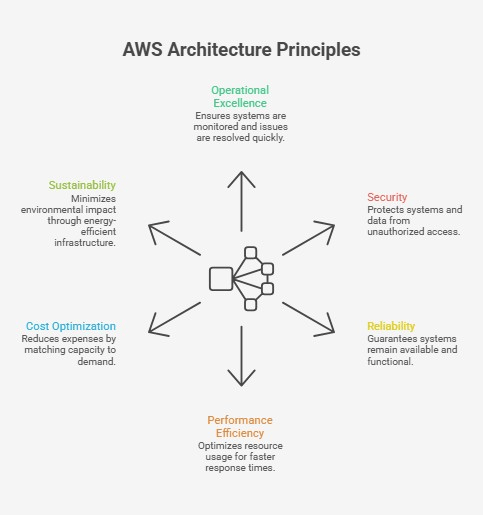
Architecture decisions shape how systems behave under load, failure, and cost pressure. To guide those decisions, these are the core principles that define how your systems perform in production:
- Operational excellence: Clear visibility and fast feedback loops enable teams to detect issues early and respond before they escalate. When systems follow the AWS Well-Architected Framework, teams see measurable impact. For example, a 2025 analysis published in the European Journal of Computer Science and Information Technology, reports that organizations adopting distributed architectures observed up to a 47% improvement in response times. This shows how structure directly affects user experience.
- Security: Every access decision and data flow introduces risk if left unchecked. Implementing strong identity controls and encryption of data at rest helps to limit the blast radius, so a compromised service does not expose the entire system.
- Reliability: Systems inevitably encounter failures under real-world traffic. Distributing workloads and isolating dependencies helps prevent a single issue from cascading across services and disrupting critical operations.
- Performance efficiency: Resource allocation determines how quickly requests move through the system. Poor allocation leads to queue buildup and latency spikes, while balanced distribution keeps services responsive under variable demand.
- Cost optimization: Idle resources and overprovisioned instances increase costs without delivering value. Aligning capacity with actual usage helps control spending, particularly in environments with bursty or unpredictable workloads.
- Sustainability: Infrastructure choices affect energy consumption at scale. AWS infrastructure is up to 4.1 times more energy efficient than on-premises environments and can reduce workload carbon footprint by up to 99%. This makes sustainable systems a direct outcome of architectural design.
Now, let's go over the best practices.
AWS Cloud Architecture Best Practices
Architecture choices shape how systems behave under load, failure, and cost pressure, so clarity matters when you operate at scale. With that in mind, these are the core practices you should evaluate to control how your systems scale, fail, and spend in production.
Scalability & Elasticity
Design your system to scale only where needed, rather than scaling everything uniformly.
Use Auto Scaling Groups with CloudWatch metrics so EC2 capacity reacts to real demand. Combine this with Elastic Load Balancing to distribute traffic across instances or containers and avoid overloading a single node.
For AI and ML workloads, scaling behavior changes significantly. Inference endpoints (such as Amazon Bedrock or SageMaker) generate bursty, unpredictable traffic patterns. To handle this, in many cases you need:
- Pre-warmed capacity or provisioned concurrency for low-latency responses
- Asynchronous processing (such as SageMaker async endpoints or queue-based architectures) to absorb spikes without overwhelming compute resources
This shifts scaling from purely reactive to a mix of pre-provisioned and event-driven strategies.
Outside of latency-sensitive AI workloads, the goal still holds: reduce fixed capacity wherever possible. Services like Lambda and AWS Fargate let you scale based on actual usage instead of keeping idle resources running.
At the application layer, keep services stateless. This allows new instances to take traffic immediately and avoids session bottlenecks that slow horizontal scaling.
Also plan for AI workloads early. Model training and inference often create short bursts of high compute demand. If your infrastructure cannot react fast enough, queues build up and latency increases along with cost.
Pro tip: Burst traffic can expose weak scaling logic faster than steady demand. Read our guide on AWS GenAI scaling to see how you can handle compute spikes without losing cost control.
High Availability & Fault Tolerance
Assume components will fail and design so the system continues to operate.
Deploy workloads across multiple Availability Zones so traffic continues even if one zone becomes unavailable. At the data layer, use RDS Multi-AZ or Aurora replication to maintain availability and prevent write interruptions during failures.
Next, reduce how failures spread. Introduce decoupling with SQS or SNS so requests queue instead of failing immediately. This allows upstream services to keep accepting traffic while downstream systems recover.
Design for graceful degradation. Keep critical paths working even when non-essential features fail.
For higher availability requirements, consider multi-region strategies. Just account for the trade-offs in latency, consistency, and operational complexity.
Security & Compliance
Limit how far a failure or breach can propagate.
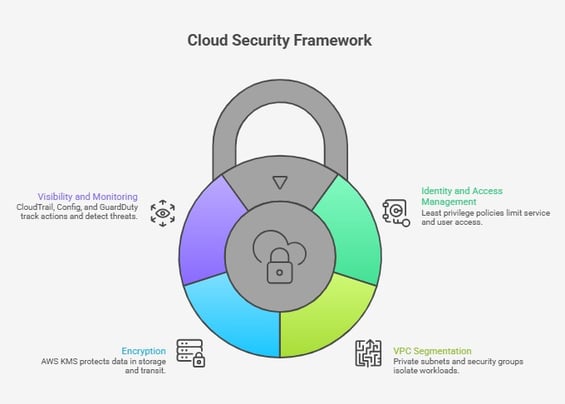
Apply IAM least-privilege policies so services and users only access what they need. Combine this with VPC segmentation, private subnets, and security groups to isolate workloads and prevent lateral movement.
Protect your data using AWS KMS for encryption at rest and in transit. Without it, sensitive data remains exposed even if access controls fail.
Enable CloudTrail and AWS Config to track actions and configuration changes. This gives you the visibility needed to investigate incidents. Add Amazon GuardDuty to detect threats early.
And lastly, we advise you to treat security as a system-wide control layer, so make sure every request is verified.
Cost Optimization
Your architecture directly influences how your system incurs costs in real time. To manage spending effectively:
- Use Savings Plans or Reserved Instances for predictable workloads. For batch or flexible workloads, use Spot Instances to reduce cost where interruptions are acceptable.
- Continuously right-size resources based on actual usage. Graviton-based instances can reduce compute cost while maintaining performance.
- Control storage growth with S3 lifecycle policies and Intelligent-Tiering so older data moves to lower-cost storage automatically.
- Track usage with Cost Explorer and Budgets so you can act before costs escalate.
- Account for AI-driven cost patterns. Model inference, training jobs, and bursty workloads can increase spend quickly if not monitored and controlled from the start.
However, in 2026, spend is driven less by idle infrastructure and increasingly by AI workloads, including large models, always-on inference, and bursty training jobs. Without governance, these patterns scale costs faster than traditional workloads.
This is where NOVA’s FinOps approach becomes relevant. NOVA combines continuous monitoring, cost visibility, and ongoing optimization to help you align infrastructure usage with business value while avoiding unnecessary spend. Contact us today to learn more!
Observability & Monitoring
Limited visibility delays response and increases impact when issues occur, especially across distributed systems. We advise you to:
- Use CloudWatch to capture metrics and trigger alarms when thresholds are crossed. This helps you react before user impact grows.
- Add distributed tracing with AWS X-Ray or OpenTelemetry to understand how requests move across services. This is critical for identifying latency sources and failure points.
- Define SLOs and alert thresholds so your team knows when the system is operating outside acceptable limits.
- Monitor scaling behavior. If new instances cannot absorb traffic fast enough, issues will show up under load first.
NOVA supports this approach by implementing observability directly within your AWS environment. It sets up CloudWatch and X-Ray to track system behavior, detect issues early, and maintain visibility across services, while ongoing monitoring and optimization help you keep performance and cost under control.
Automation & Governance
Manual processes introduce inconsistency, and inconsistency leads to failures.
To prevent that, use Infrastructure as Code to define environments in a repeatable way. This ensures development, staging, and production behave the same.
Automate deployments with CI/CD pipelines using tools like CodePipeline and CodeBuild so changes move through systems without manual steps.
Enforce policies programmatically so configurations stay aligned over time. This reduces the risk of misconfigurations that can expose services or increase costs.
Plus, track configuration drift and correct it early before it accumulates into instability.
Pro tip: Manual fixes create drift faster than most teams expect. Read our guide on cloud DevOps best practices to see how automation can keep deployments consistent.
Data & Storage Architecture
Data structure defines how quickly systems respond, how costs grow, and how easily new capabilities can be added. When storage is not aligned with access patterns, latency increases, and costs rise without clear visibility.
To manage this:
- Amazon S3 provides durable object storage for large datasets, logs, and backups. However, not all data needs the same access speed.
- This is where S3 Intelligent-Tiering automatically moves data between storage classes based on usage. It reduces cost without manual intervention. In parallel, lifecycle and archival policies shift older data to lower-cost tiers, which prevents storage from expanding unchecked.
- For applications that require fast, predictable response times, DynamoDB handles low-latency NoSQL workloads. This becomes important when systems must serve requests without delays caused by disk-based storage.
At the same time, data availability must extend beyond a single region. Replication strategies enable systems to maintain access even during regional disruptions, but they introduce trade-offs in consistency and cost that must be managed carefully.
Finally, data design now supports more than storage. We believe that AI-ready data pipelines require structured datasets that support model training and inference. This includes capabilities such as vector indexing, knowledge bases, and retrieval pipelines. Without this foundation, introducing AI features later becomes significantly more complex, time-consuming, and costly.
Pro tip: Data structure becomes a blocker the moment you add retrieval or AI search. Read our guide on AWS Bedrock RAG to see how storage and retrieval choices shape results.
Hybrid & Migration Architecture
Avoid carrying legacy constraints into your AWS environment.
If you need hybrid connectivity, use AWS Direct Connect or VPN to establish controlled communication between on-premises and cloud systems.
Remember: Do not replicate VMware-based patterns directly in AWS. This keeps systems tightly coupled and limits scalability while increasing operational overhead. Instead, redesign workloads using AWS-native services such as stateless compute, managed databases, and event-driven components.
We also advise you to use a phased migration approach. Start with dependency mapping and assessment, then move workloads incrementally to reduce risk and maintain system stability.
To support this shift, NOVA can help you migrate from VMware to AWS. The process takes a structured approach that starts with assessment and dependency mapping. This makes it clear which components can move safely and which require redesign. From there, phased execution reduces risk during migration while maintaining system availability.
Over time, this approach helps you move away from legacy constraints and operate systems that are easier to scale, update, and control.
Services and Tools for AWS Cloud Architecture
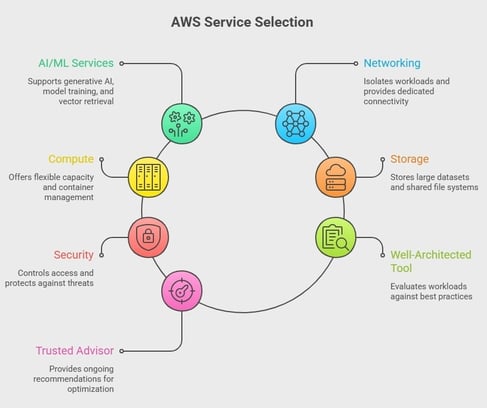
Choosing the wrong AWS services creates unnecessary cost and operational overhead. Selecting the right architecture stack is a core design decision. To make those decisions clearer, these are the core AWS services and tools we use, and you should evaluate in production environments:
- AI/ML Services: Amazon Bedrock supports generative AI use cases, while Amazon SageMaker handles model training and deployment. In addition, services like OpenSearch enable vector-based retrieval, which affects how quickly AI systems return relevant results under load.
- Networking: Amazon VPC isolates workloads, and AWS Direct Connect provides dedicated connectivity. This matters because network design determines how traffic flows between services and how latency behaves across regions.
- Compute: Amazon EC2 gives flexible capacity, AWS Lambda removes the need for always-on instances, and ECS or EKS manage containers. Graviton-based instances reduce cost for sustained workloads, especially when compute demand is predictable.
- Storage: Amazon S3 stores large datasets, EBS supports block storage for compute workloads, and EFS enables shared file systems. Each option affects access speed and cost depending on usage patterns.
- Security: IAM controls access, while AWS Shield and WAF protect against external threats. AWS KMS manages encryption, which affects how data is secured across services.
- AWS Well-Architected Tool: Evaluates workloads against best practices and shows high-risk areas that impact reliability and cost.
- AWS Trusted Advisor: Provides ongoing recommendations that help identify inefficiencies, so you can adjust architecture decisions before issues grow.
How NOVA Delivers Cloud Architecture Engagements
Architecture decisions carry risk long before deployment begins, which is why NOVA structures every engagement around how systems behave in production rather than how they look on paper.
Assessment Before Any Change
We start every engagement with an assessment-first architecture review aligned with real production risk. This means mapping dependencies, identifying hidden service interactions, and understanding how workloads behave under load.
As a result, the migration scope becomes clear, and cutover plans include defined rollback paths instead of assumptions.
Designing for AWS, Not for Legacy
Extending legacy hypervisor-based environments into AWS often carries forward the same constraints that caused issues in the first place.
NOVA emphasizes AWS-native architectures, leveraging services such as EC2, RDS, and container platforms to enable systems to scale and recover without relying on traditional VMware-based patterns. This approach not only improves scalability and resilience but also helps reduce licensing overhead and simplifies operations after migration.
Building with Control from Day One
We 100% believe that consistency matters once systems grow. So, we implement Infrastructure as Code from the start, which means environments are provisioned in a repeatable way and remain aligned across deployments.
At the same time, built-in cost governance and operational monitoring provide visibility into usage, performance, and spend without waiting for post-launch fixes.
Supporting Transition Without Disruption
Migration rarely happens in a single step. That's why our Bridge Support keeps VMware environments stable during transition when valid licenses are still in place, which reduces operational pressure while workloads move in phases.
In parallel, our Asset Relief options reduce overlap on-prem hardware costs, so capital is not locked into infrastructure scheduled for retirement.
Stabilization After Go-Live
Cutover does not end the work. Our post-launch stabilization focuses on incident handling, performance tuning, and cost control under real traffic conditions. This approach allows your systems to operate predictably over time, instead of degrading as complexity increases.
From Architecture Decisions to Predictable Systems
Small architectural decisions shape how systems scale, fail, and generate cost, especially under real production pressure. When those decisions align with workload behavior, systems handle traffic spikes, isolate failures, and keep costs controlled without constant intervention.
At the same time, gaps in scaling, visibility, or data design create compounding issues that slow delivery and increase risk. A structured approach that combines AWS-native design, cost governance, and operational monitoring allows you to regain control and maintain stability as systems grow.
Need a Stronger AWS Cloud Architecture?
NOVA helps organizations redesign cloud environments for scalability, resilience, governance, and cost efficiency.
Book a Free Architecture Assessment
FAQs
How do we know if our current AWS architecture needs a redesign?
A redesign is needed when systems show unstable behavior under load, rising costs without clear drivers, or slow recovery during failures. These signals indicate that your architecture choices no longer match workload patterns. Recurring incidents or delayed deployments confirm that underlying dependencies and scaling logic require change.
What risks should we evaluate before committing to a large-scale AWS architecture modernization?
The main risks include hidden dependencies, incomplete workload mapping, and unclear rollback strategies. When these are missed, migrations cause service disruption or extended downtime. Cost exposure also increases if legacy patterns are carried forward instead of being redesigned.
How does NOVA structure an AWS architecture engagement from assessment to production rollout?
NOVA structures engagements by starting with a detailed assessment that maps dependencies, risks, and sequencing before any changes begin. This creates a clear execution plan with phased migration steps and defined fallback options. From there, implementation follows controlled deployment patterns, supported by monitoring and cost governance.
How do Bridge Support and Asset Relief fit into an AWS transition strategy?
Bridge Support keeps existing VMware environments stable during migration, which allows workloads to move without operational pressure. At the same time, Asset Relief reduces financial strain by converting on-prem hardware into usable capital. Together, these remove both technical and financial blockers during transition.
What level of internal engineering maturity is required to work with NOVA on AWS cloud architecture?
A highly advanced internal team is not required, but a basic understanding of existing systems and workloads is expected. NOVA handles architecture design, migration planning, and operational setup while aligning with your team’s capabilities. This allows teams to stay focused on delivery while architecture evolves.
Comments